
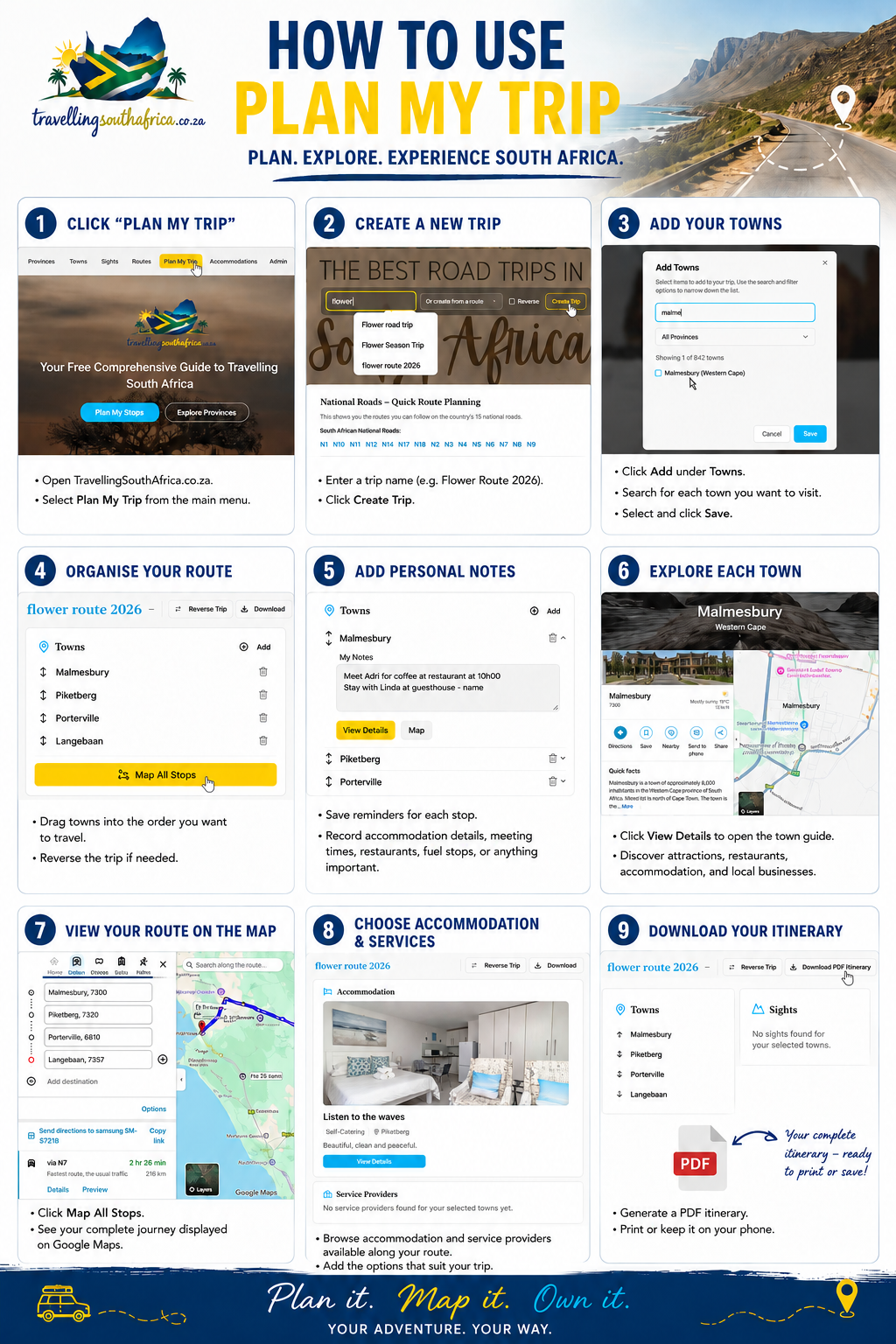
Frequently Asked Questions – How to Use the "Plan My Trip" Feature
FAQ - How to use the plan my trip feature
Frequently Asked Questions – How to Use the "Plan My Trip" Feature
Planning a road trip across South Africa has never been easier. Whether you're heading to the West Coast for the flower season, exploring the Garden Route, or discovering hidden gems in the Karoo, the Plan My Trip feature on TravellingSouthAfrica.co.za helps you organise your journey from start to finish.
Below are the most common questions about using this feature.
What is the "Plan My Trip" feature?
The Plan My Trip feature is your personal travel planner. It allows you to create customised road trips throughout South Africa by adding destinations, organising your route, and saving everything in one convenient place.
Instead of trying to remember every stop or keeping notes on different devices, your entire itinerary is stored securely in your TravellingSouthAfrica.co.za account.
Do I need an account?
Yes. Registration is completely FREE.
Creating an account allows you to:
Save multiple trips
Edit your itineraries anytime
Access your travel plans from anywhere
Keep all your travel notes together
Registration only takes a few minutes.
How do I start planning a trip?
Getting started is simple.
Step 1
Log in to your TravellingSouthAfrica.co.za account.
Step 2
Open the Plan My Trip section.
Step 3
Click Create New Trip.
Step 4
Give your trip a name, such as:
West Coast Flower Adventure
Garden Route Holiday
Karoo Explorer
Cape to Kruger Road Trip
How do I add towns to my trip?
Simply search for the towns you want to visit and add them to your itinerary.
For example:
Cape Town
Langebaan
Paternoster
Vredenburg
Clanwilliam
Springbok
You can add as many destinations as you like and organise them in the order you plan to travel.
Can I change the order of my destinations?
Absolutely.
If your travel plans change, simply rearrange your destinations to create a new route. Your itinerary can be updated whenever you need.
Can I save my trip and come back later?
Yes.
Every trip you create is saved to your account, allowing you to continue planning whenever it suits you.
This is especially useful if you're planning a holiday several weeks or months in advance.
Can I add notes to my trip?
Yes.
Use the planner to keep track of important information such as:
Places you want to visit
Attractions
Restaurants
Accommodation
Fuel stops
Packing reminders
Important phone numbers
Everything stays together with your itinerary.
Can I use the planner for short day trips?
Definitely.
The planner isn't only for long holidays. It's perfect for:
Weekend getaways
Day trips
Family outings
Business travel
Scenic drives
Camping adventures
No matter how long your journey is, you can keep everything organised.
Why should I use the Plan My Trip feature?
Planning ahead makes travelling easier and more enjoyable.
With the Plan My Trip feature you can:
Organise your entire journey
Discover new towns
Explore hidden gems
Keep all your travel notes together
Save multiple itineraries
Update your plans whenever you need
It takes the stress out of planning so you can focus on enjoying the journey.
Is the feature free?
Yes.
Creating an account and using the Plan My Trip feature is completely free for travellers.
Start Planning Today
South Africa is home to hundreds of incredible towns waiting to be explored.
Whether you're travelling for a weekend or embarking on an unforgettable cross-country adventure, the Plan My Trip feature gives you everything you need to organise your journey with confidence.
Create your free account today, start planning your next adventure, and discover why every town has a story worth exploring.
TravellingSouthAfrica.co.za – Plan it. Map it. Own it.